Draft Putt
A mini golf game where you pick two obstacles, place them, then putt.
About this game
Draft Putt is a free mini golf game in your browser. Pick two of four obstacle pieces, place them on the course, then drag back to putt. Beat the par a computer caddy sets on the Daily Course or a Random Course. Nine holes per round, with no download or account.
Draft Putt is a free mini golf game to play online, with one extra step: you build part of each hole before you play it. A round is nine holes, and every hole starts bare, with only its walls, the tee, the cup and any water or sand that belongs to it. The hole's par is shown from the start, so the target is clear before your first putt.
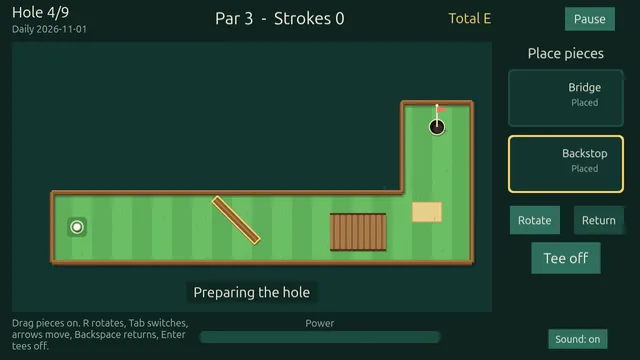
Then comes the draft. You are offered four obstacle pieces and keep two. The set holds a bumper that kicks the ball away, a backstop bar that works as a solid wall, a sand trap that slows the ball, a slope that pushes it along an arrow, a boost pad that gives a one-time kick, and a bridge that makes water safe to cross. Bridges only turn up on holes with water. Drag each piece onto the course and turn it in small steps. A green ghost means the spot works; a red one says why not, such as too close to the tee or blocking the hole. Using fewer than two pieces is allowed.
Putting is a drag-back gesture. Press anywhere on the field, pull away from the direction you want to hit, and let go. A longer pull means a harder putt. A dotted line previews direction and strength but does not show bounces, so bank shots off walls and bumpers are yours to judge. The ball physics repeat exactly, so a miss comes from your aim or your placement, not from luck. Water sends the ball back to where you hit it from and adds a stroke. A fast ball rolls over the cup, while a slow one near the edge drops in. A hole ends when the ball sinks or after eight strokes.
A computer caddy sets the par. Before you play a hole, the caddy plays it first on the bare course, and its result decides the par, which is the same for every player. After each hole you get a result name such as Birdie, Par or Bogey. When the round ends, a scorecard shows your total against par and awards one to three stars. When a mulligan is offered, you can use it once per course to retake your last shot.
The Daily Course is a new mini golf course each UTC day, with the same nine holes, piece offers and pars for everyone, and finishing it on consecutive days builds a streak. A Random Course is new every time and has a short code, so you can replay it. Stars unlock new ball colours, and the menu shows the next colour and the stars it needs. The scorecard has a Copy score button that copies your result as text. A round takes about four to eight minutes, there is no timer, and progress is saved in your browser. It works with mouse, touch or keyboard only, and phones play best held sideways.
How to play
- Choose Daily Course for today's holes or Random Course for a fresh one. Continue appears if you left a round unfinished.
- Each hole starts bare, with its par at the top. Pick two of the four piece cards, or skip the pieces, then confirm.
- Drag your pieces onto the course. A green ghost is a valid spot and a red one gives the reason. Rotate a piece if it helps, then press Tee off.
- Press anywhere on the field and drag back away from the direction you want to hit. The further you pull, the harder the putt. Release to shoot.
- Keep putting until the ball drops into the cup. Water adds a stroke, and the eighth stroke ends the hole.
- Read the hole summary and continue. After hole nine the scorecard shows your total against par, your stars and a Copy score button.
Controls
| Action | Keyboard | Mouse | Touch |
|---|---|---|---|
| Pick a card | 1..4 | click | tap |
| Confirm picks / Tee off | Enter | click button | tap button |
| Move a piece | arrow keys 20 units (Shift 4), Tab cycles pieces | drag | drag |
| Rotate selected piece | R / Shift+R | button, wheel, R | rotate button |
| Return piece to panel | Backspace | drag to panel | drag to panel |
| Aim and power | Left/Right turn (hold; Shift = slow), Up/Down +-1 degree, hold Space to charge, release to putt | press anywhere on field, drag back, release | same |
| Cancel shot | Esc while charging | drag back inside the dead zone, or Esc | drag back inside the dead zone |
| Fast-forward roll | hold Space (not while charging) | hold click | hold touch |
| Continue from summary | Enter / Space | click | tap |
| Pause | Esc or P; also automatic on window blur, visibility hidden, orientation to portrait | Pause button | Pause button |
Tips
- Try a backstop bar just behind the cup. A putt that would roll past can bounce back toward the hole.
- Do not hit too hard at the cup. A ball moving too fast rolls over it, while a slow ball near the edge drops in.
- The dotted line shows direction and strength but not bounces. Plan bank shots yourself and adjust a little after each try.
- When a bridge is offered on a hole with water, it can turn a risky shot into a safe one, since the water under it counts as solid ground.
- Skipping pieces is allowed. If none of the four suits the hole, use one or none and get straight to the putt.
- If a mulligan is offered, keep it for a shot that cost you dearly, such as a splash. It restores the position and stroke count from before that shot.
Frequently asked questions
- What is Draft Putt?
- It is a mini golf game where each of nine holes starts bare and you pick two of four obstacle pieces to place before you putt. You then try to finish in as few strokes as you can against the hole's par.
- How is par decided?
- A computer caddy plays each hole first on the bare course, and its result sets the par. The par is the same for every player, and it is shown before you start the hole.
- Is the Daily Course the same for everyone?
- Yes. It is built from the UTC date, so everyone gets the same nine holes, the same piece offers and the same pars that day. You can replay it, and your best score for the day is kept.
- What is a mulligan and when can I use it?
- A mulligan lets you retake your last shot, restoring the ball position and stroke count from before it. It is optional, appears only when offered, and can be used once per course.
- What happens if the ball goes in the water or I take too many strokes?
- Water sends the ball back to where you hit it from and adds one stroke. If the ball has not sunk after eight strokes, the hole ends and scores eight.
- Do I need to download anything, and does it work on a phone?
- No download or account is needed, and your progress is saved in your browser. It works with touch, mouse or keyboard, and a phone should be held sideways because portrait shows a rotate message.