Bankshot Range
A timed shooting gallery game where each hit gives your ricochet bolt another bounce.
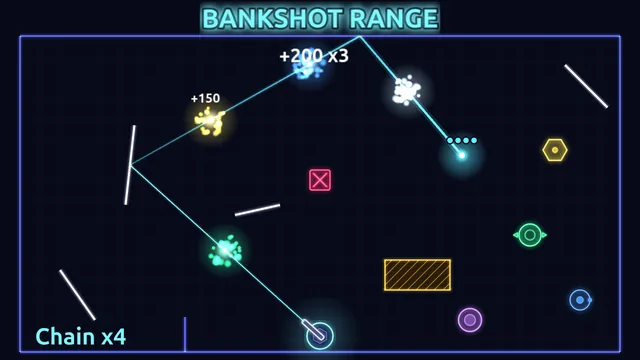
About this game
Bankshot Range is a free shooting gallery game that runs in your browser with no download. Bank a ricochet bolt off mirrors to pierce moving targets. Every target you destroy gives the bolt one more bounce, so one clever shot can chain through the whole range. Play 30 timed ranges and a daily challenge on desktop or phone.
Bankshot Range is an online shooting gallery game where the shot is a route, not a single hit. A turret at the bottom of the screen fires one ricochet bolt at a time. The bolt does not stop at a target: it pierces straight through, reflects off walls and mirrors, and flies on until it runs out of bounces or distance. Targets slide, pop in and out of view, orbit and cross the screen.
Bounces are what this ricochet game is built on. Every shot starts with two. A wall costs one, a mirror costs nothing, and every target the bolt destroys gives one back, up to a maximum of eight. A good shot pays for itself: bank off a wall, thread two targets, glance off a free mirror, and the bolt reaches the next target with more bounces than it started with. A wall hit with no bounces left ends the shot on the spot.
Scoring rewards long chains. Each target in one shot is worth more than the one before it, and a run of shots that each destroy something builds a multiplier of up to x2. A shot that chains four or more targets earns an extra bolt. Clear every target for a sweep bonus, finish ten or more shots without a miss for a no-miss bonus, and use all your bolts with time to spare for a time bonus.
The campaign has 30 ranges in six chapters of five: Warm-Up Lanes, Mirror Hall, Dead Zones, Moving Parts, Spin Cycle and Gauntlet. A range gives you 16 to 20 bolts and a timer of 55 to 75 seconds, and the timer only starts when you fire your first bolt. Mirror Hall adds angled deflector mirrors and darts that give extra time. Dead Zones adds absorbers that stop the bolt, decoys marked with an X that cost points and break your streak, and shields that must be hit from the open side. Moving Parts adds sliding mirrors, orbiting targets and splitters that burst into shards. Spin Cycle adds spinning mirrors and rotating shields, and the Gauntlet packs every target type into dense layouts.
Each range ends with a result screen showing one to three stars (90 in all) and your score. One star unlocks the next range. If a range will not give in, a Skip option unlocks the next one after three failed tries. Once a day there is also the Daily Range, a single layout built from the date and the same for everyone that day, with your best score and a day streak kept.
A round lasts a minute or so, which makes it a quick target shooting game for a short break or a longer session. It plays in landscape with a mouse, a keyboard or a touch screen. Progress and settings are saved in your browser, so there is no account to make and no download.
How to play
- Press Play and choose Range 1-1. A short card names the new idea for that range, and the timer stays frozen until you fire your first bolt.
- Aim the turret. A solid line shows where the bolt first lands, and a short faint stub shows which way it will bounce off. The line passes through targets, because the bolt does too.
- Fire. Only one bolt flies at a time, and it starts with two bounces.
- Plan the route. Walls cost one bounce, mirrors are free, and each target destroyed gives one back. Aim so the bolt visits as many targets as it can before it runs dry.
- Avoid what ends a bolt early: absorber blocks, and decoys marked with an X, which also reset your streak and cost points.
- Spend your bolts before the timer runs out. When the last bolt lands or time is up, the result screen shows your stars, score and a breakdown.
- Press Next once you have a star, or Retry to chase a higher score.
Controls
| Action | Keyboard | Mouse | Touch |
|---|---|---|---|
| Aim | Left and Right arrows, or A and D: turn the turret at 100 degrees per second | Move the pointer: the turret turns to face it and the aim line follows | Press anywhere on the field and drag away from where you want to shoot: the turret points opposite the drag. Drag more than 24 px to show the line; longer drags are more precise. Power is fixed |
| Fire | Space, Enter or Up arrow | Press on the field, then release to fire | Lift your finger |
| Fine aim | Hold Shift or Ctrl while turning: 20 degrees per second | While the button is held, the aim keeps following the pointer, so adjust before you release | Two nudge buttons at the bottom corners: each tap turns the turret half a degree, and holding repeats |
| Cancel a shot | - | While the button is held, right-click or press Esc: nothing fires | Drag back inside the 24 px dead zone, or put a second finger down, then lift: nothing fires |
| Pause or resume | Esc or P | Pause button, top right | Pause button, top right |
| Mute | M | Sound button on the pause screen, or Sound effects in Settings | Sound button on the pause screen, or Sound effects in Settings |
Tips
- Aim at a wall or a mirror, not at a target. The bolt pierces targets, so the best line is the one that crosses several of them.
- Watch the bounce dots above the bolt. Each dot is a bounce left, so spend them on walls only when the bank is worth it and use free mirrors where you can.
- Take your time before the first shot. The targets are already moving, but the timer does not start until you fire.
- Poppers only count while they are lit, and moving and spinning mirrors change where the bolt goes. The aim line is only a snapshot of a moving mirror, so time your shot.
- A shield reflects the bolt and costs a bounce when you hit its arc. Reach it from the open side to destroy it.
- A miss or a decoy hit resets your streak multiplier, so take the safer shot when you have time to spare.
Frequently asked questions
- How do bounces work?
- The bolt starts every shot with two bounces. A wall or the arc of a shield costs one, mirrors, moving mirrors and spinning mirrors cost nothing, and every target destroyed gives one back, up to eight. Once the bolt has none left, the next wall hit ends the shot, and an absorber ends it at once.
- How do stars work, and what if I get stuck?
- Each range has a target score: part of it earns one star, more of it earns two, and reaching it earns three. One star unlocks the next range. If you fail the newest range three times, a Skip range button unlocks the next one without stars.
- What does the Easy aim guide do?
- In Settings, set Aim guide to Easy and the game also draws a faint dashed second leg of your shot, up to the next surface. Stars are not affected, but your best score for that range is marked with an A so you can tell it apart.
- What is the Daily Range?
- It is one layout built from the date in UTC, so everyone gets the same range on the same day and a new one starts at UTC midnight. It has 18 bolts and 65 seconds, is open from the start, and keeps your best score for the day and a streak of consecutive days played.
- Are my scores saved, and do I need an account?
- No account or download is needed. Stars, best scores, unlocked ranges and settings are saved in your browser when a round ends, and Settings has a Reset progress button that asks you to confirm. A round in progress is not saved, so closing the tab ends that attempt.
- Are there ads, and what is the Bonus Volley?
- Ads appear only on result screens, never during a round. If a round ends with no stars, you may be offered a Bonus Volley: watch one ad to continue the same round with 3 more bolts and 10 more seconds, once per attempt, with stars capped at two. It is optional, and you can play every range without it.
- Can I play Bankshot Range on a phone?
- Yes, in landscape. Press and drag away from where you want to shoot, then lift your finger to fire, and use the two nudge buttons at the bottom corners to fine-tune the angle. If you hold the phone upright, the game pauses and asks you to rotate it.