Cleavefield
An asteroid shooter game where every rock splits along the line of your shot.
About this game
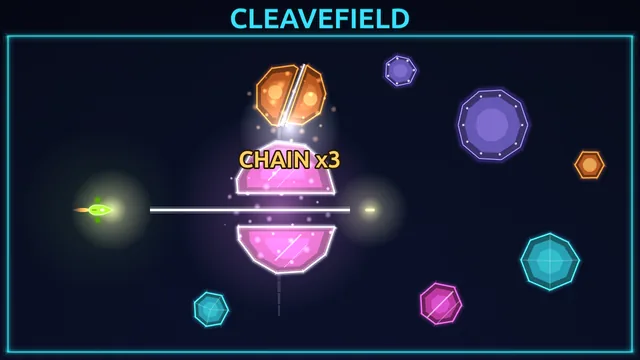
Cleavefield is a free asteroid shooter game that runs in your browser with no download. Fly an inertia ship around a walled arena and shoot space rocks that split along the exact line of your bullet. Aim so the shards crash into the next rock, and clear eight fields of rising difficulty.
Cleavefield is an asteroid shooter game built on one rule: a bullet cuts a rock in two along the exact line it travels. You fly an inertia ship around a walled arena full of drifting, glowing polygon rocks. The two pieces of a cut rock fly apart at right angles to the shot, and the smaller piece moves faster. There is no auto-aim. Your bullets do not pick up the ship's speed, so the cut always follows the way your nose points, even while you drift sideways.
The skill is in the angle. A freshly cut piece stays hot for about a second and a half, and a hot shard that crashes into another rock cuts that rock too. Only the pieces of your bullet's cut, and the pieces of the cut a hot shard makes, are hot, so every chain has a natural limit. Each new bullet starts a new chain, so a big chain comes from lining up the shot, not from firing more often. Walls do not wrap around: your ship and the shards bounce off them, bullets stop at them, and they never hurt you.
There are eight fields, from First Cut, where three still rocks sit in a row, to Cleavefield, where everything arrives at once. Rocks come in four materials, starting with plain quartz. Glass shards fly fast and crumble early, which makes long chains possible and close calls likely. Basalt is heavy and armoured: the first hit only cracks it, and the second cuts along that second bullet's line. Ember rocks explode when cut, throwing nearby rocks around and hurting your ship if you are too close. Hazards join in as you go: pylons from field 3 bounce shards and absorb bullets, gravity wells from field 5 pull on rocks and on you, and from field 7 telegraphed comets shove rocks and damage your ship.
A run starts with three hull points. Touching any rock, an ember blast or a comet costs one, and each cleared field gives one back, up to three. Every field has three goals worth a star each: clear it, make a single chain of a set size, and finish inside the par time without losing hull in that field. That is 24 stars in all, and clearing a field unlocks the next whatever your star count. After you clear field 5, the Daily Field opens: a five-field run built from the date, with the same rocks for everyone on the same date.
Cleavefield is a browser space game that needs no download and no account. It is an asteroid game online free to play, with a keyboard, a mouse or a touch screen in landscape. Ads appear only at natural breaks and never while you fly, and an optional shield revive is offered once per run if you choose to watch an ad.
How to play
- Press Play and start field 1, First Cut. Three rocks sit in a row, and your ship has a short shield at the start of every field.
- Turn to face a rock and fire. Your ship keeps drifting after you thrust, so brake to hold a spot while you aim.
- Choose the angle with care. Shards fly off at right angles to your shot line, so shoot across a rock in a way that sends its pieces toward the next one. A hot shard cuts any rock it hits.
- Keep clear of the rocks, ember blasts and comets. You have three hull points, and each cleared field gives one back up to three.
- Clear every rock to finish the field. The result card shows which of the three star goals you met: clear, chain and par time.
- Move on through the eight fields. Clear field 5 to open the Daily Field, and replay any field to collect the stars you missed.
Controls
| Action | Keyboard | Mouse | Touch |
|---|---|---|---|
| Turn | A and D, or the Left and Right arrow keys | Move the pointer: the ship turns toward it. A held turn key takes over while pressed | Drag a floating stick that appears where your thumb lands: the ship turns toward the direction you drag |
| Thrust | W or the Up arrow | Hold the right mouse button, or hold W, the Up arrow or Space | Drag the stick further from where you first touched |
| Brake | S or the Down arrow | S or the Down arrow | Lift your thumb and the ship slows to a stop |
| Fire | Space or J (hold to repeat) | Hold the left mouse button. Space also fires while it thrusts | Automatic while you drag the stick. In Settings, Touch fire can switch to a tap ring that you hold to shoot |
| Pause or resume | Esc or P | Pause button, top right | Pause button, top right |
| Mute | M | M, or the Sound setting in Settings | Sound setting in Settings |
Tips
- Think in right angles. Shards leave sideways to your shot line, so to send pieces left and right, shoot up or down through the rock. In field 1, a vertical shot through the east side of the first rock drives a shard into the second.
- Bank shards off the walls and pylons. They bounce, so a shard can reach a rock you cannot line up directly. Bullets stop at walls, so only shards ricochet.
- Respect each material. Glass shards are fast and great for chains, but they can hit you just as fast. Shoot embers from a distance and use the blast to fling nearby rocks. Basalt needs two shots, so plan the angle of the second one.
- Keep the sight line on in Settings. It is a faint guide to the way your ship points, and it does not aim for you.
- Do not rush for par. The goal fails if you lose hull in that field, so after a cut, brake and step away from hot shards, since they can hurt you too.
- When four or fewer rocks are left they slow down on their own. Use that calm stretch to line up clean shots rather than chase them.
Frequently asked questions
- How does cutting a rock work?
- Your bullet slices a rock along the line it travels, and the two pieces fly apart at right angles to that line, with the smaller piece moving faster. A glancing shot only shaves a rock, and very small pieces crumble to dust. Basalt is the exception: its first hit cracks it and the second hit cuts it.
- What are hot shards and chains, and do the walls matter?
- New pieces glow with a white rim and stay hot for about a second and a half, and a hot shard that hits another rock cuts it too. That is a chain, and each new bullet starts a new one. Walls and pylons bounce shards, so you can bank them into rocks, but bullets stop at walls and the walls never damage your ship.
- How do the stars work?
- Each field has three goals worth a star each: clear every rock, make one chain of a set size, and finish inside the par time without losing hull in that field. Chain targets rise from 3 cuts in the early fields to 6 in the last, and par times run from 25 to 56 seconds. A clear unlocks the next field, so stars never block your progress.
- What is the Daily Field?
- It is a five-field run built from the layouts of fields 3, 5, 6, 7 and 8, with the rocks placed from the date, so the same date gives the same fields. It unlocks once you clear field 5, you start with three hull, and your best score for the date is kept. It does not award stars.
- Is my progress saved, and do I need to download anything?
- No download or account is needed. Your stars, best scores, unlocked fields and settings are saved in your browser, and Settings has a Reset progress button that asks for a second tap before it erases anything. There is no save in the middle of a field, so closing the tab ends the run you were on.
- Do I have to watch ads, and what is the shield revive?
- No. Ads appear only at breaks such as after a field, on the run-over screen or when you return to the menu, never while you are flying or paused. When your hull runs out the game may offer a revive: if you choose to watch an ad you return with one hull and a three-second shield, nearby rocks are pushed away, and the field carries on. It can be used once per run, the button is hidden when no ad is available, and you can pick Finish run instead.
- Does Cleavefield work on a phone?
- Yes, in landscape. Drag a thumb on the left side of the screen to turn toward the drag and fire automatically, drag further to thrust, and lift the thumb to brake. Settings can move the stick to the right side, and holding the phone upright pauses the game with a message asking you to rotate it.